
Introduction – 2023, the Year of AI in Low-Code
2023 marked a turning point for low-code platforms globally.
Artificial Intelligence (AI) moved from research to mainstream adoption. Microsoft introduced Copilot into the Power Platform, allowing users to describe apps, flows, and dashboards in natural language. This marked the transition from low-code to AI-assisted development, fundamentally reshaping productivity and enterprise automation.
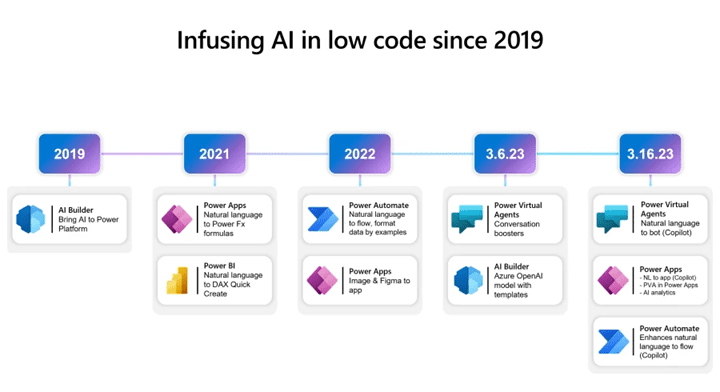
Evolution of Power Platform Before Copilot
Between 2020–2022, Power Platform emphasized democratized development.
It empowered citizen developers and professional developers to build apps, automate workflows, and create data insights.
Fusion teams emerged as the enterprise model. Dataverse matured as the data backbone. Governance via DLP and CoE frameworks was widely adopted.
Challenges Pre-Copilot:
Steeper learning curve for non-technical users.
Manual building of flows and UI elements.
Scaling solutions required significant IT oversight.
Copilot addressed these challenges by lowering barriers and accelerating time-to-value.
What is Copilot in Power Platform?
Copilot is a natural language assistant integrated across Power Apps, Power Automate, and Power BI.
Capabilities:
Generate app UIs and data models from prompts.
Build automation flows from text instructions.
Summarize, explain, and modify existing flows.
Query datasets conversationally in Power BI.
Example Prompt:
“Build an app to track expense claims with manager approval.”
Copilot output:
Dataverse table for expenses.
App forms for submission/approval.
Flow for approval workflow.
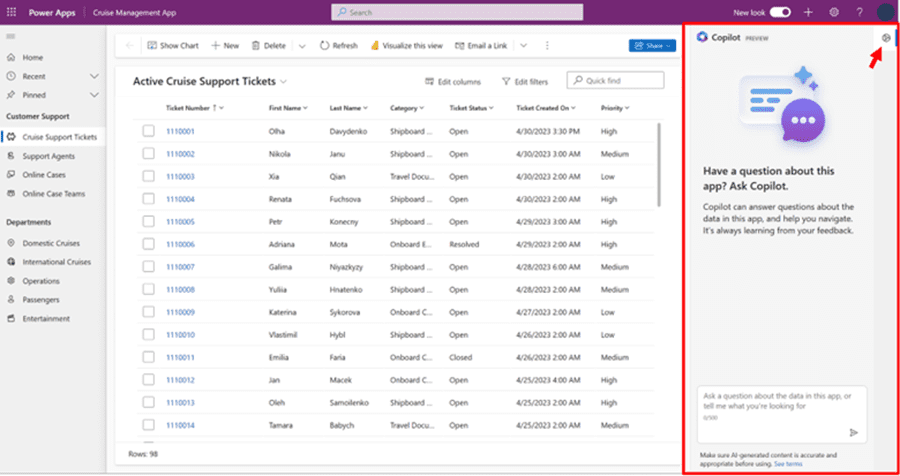
Technical Deep Dive — Copilot in Action
Copilot in Power Apps:
Create screens/forms automatically.
Suggest data relationships based on intent.
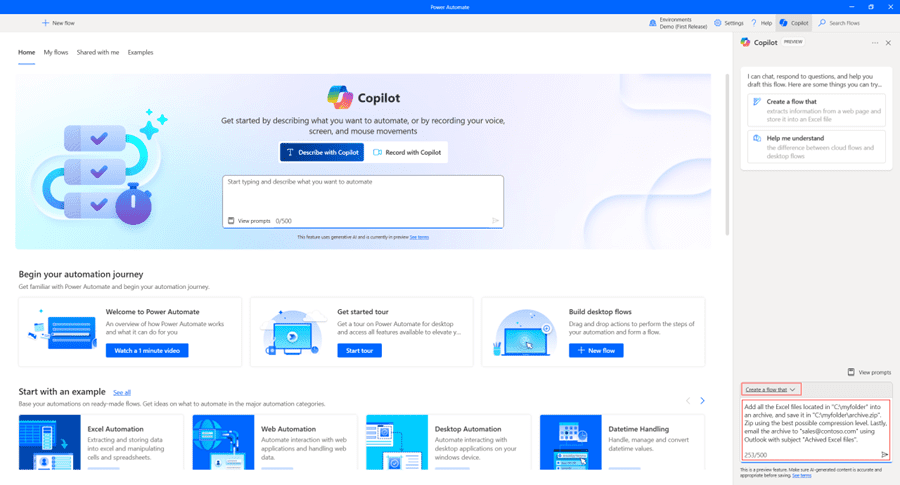
Copilot in Power Automate:
Natural language to flow logic.
Example: “When I receive an email from HR, save attachments to OneDrive and notify me in Teams.”
Copilot generates Outlook trigger + OneDrive save + Teams notification.
Copilot in Power BI:
Conversational data exploration.
Example: “Show sales by product over the last year grouped by region.”
Workflow:
User Prompt → Copilot → Suggested App/Flow → User Validation → Published Solution
Governance, Security, and AI-Generated Logic
Copilot requires guardrails to prevent misuse.
Governance features:
Tenant-level Data Loss Prevention (DLP) policies block risky connector combinations.
Sandbox-first approach: validate Copilot outputs before Prod deployment.
Human-in-the-loop validation ensures accountability.
Security tips:
Validate API/connector usage suggested by Copilot.
Enable logging/audit of Copilot interactions.
Business Impact and Global Adoption
Copilot transformed enterprises by reducing development cycles and expanding who could build.
Benefits:
Faster delivery (hours vs weeks).
Reduced IT backlog.
Empowerment of non-technical roles.
Global examples:
Healthcare: Intake apps built rapidly with Copilot.
Finance: Automations for compliance approvals.
Government: Permit processing simplified.
Future of Fusion Teams with AI Assistance
Fusion teams evolved with Copilot in 2023.
Now:
Citizen devs prototype solutions with Copilot.
IT ensures governance guardrails.
Pro devs extend apps via Azure Functions/APIs.
Outcome:
Faster collaboration.
Reduced friction between business and IT.
AI accelerates delivery for all roles.
Fusion teams are now AI-assisted collaboration units.
The Road Ahead – Power Platform + AI Beyond 2023
Copilot in 2023 was the start.
Future directions:
Copilot Studio: build custom copilots for org needs.
Integration with Microsoft Fabric: unify data + AI + automation.
2024+ shift: Autonomous agents capable of independent decision-making.
Prediction:
AI-first low-code becomes the default enterprise development model.
Conclusion
2023 was the inflection point. Copilot changed Power Platform from a low-code toolkit to an AI-powered development ecosystem. It redefined speed, accessibility, and collaboration in global enterprises.
Takeaway:
AI didn’t replace developers, it empowered everyone to become a maker, speeding up innovation worldwide.